
What is the best gaming mouse? The ideal choice truly depends on your individual needs, but investing in a quality mouse can profoundly transform your interaction with your gaming PC. A high-performance mouse, equipped with the right features, can be the deciding factor between victory and defeat in your favorite games, or it can simply unlock more functionality than you ever imagined.
Currently, our top recommendation for most gamers is the Razer Viper V3 HyperSpeed, thanks to its ergonomic design, exceptional performance, and surprisingly affordable price. For those seeking the ultimate lightweight wireless experience, we’ve selected the Logitech G Pro X Superlight 2. If you’re on a budget, the new Glorious Model O Eternal offers outstanding value. Regardless of your preferences, this list features a perfect mouse for you, alongside many other excellent options detailed in the Also tested section. If you’re unsure what to prioritize, explore our how to choose guide and the FAQ section for answers to all your gaming mouse queries.

Razer Viper V3 HyperSpeed
Best gaming mouse for most

| Sensor | Razer Focus Pro 30k Optical |
| Battery Life | Up to 280 hours (1,000Hz), Up to 50 hours (8,000Hz) |
| Max DPI | 30,000 |
| Buttons | 6 |
| Weight | 82g |
- Ultra responsive
- Long battery life
- Fast polling rate
- Heavy compared to the market trend
The Viper V3 HyperSpeed offers incredible value. This wireless gaming mouse boasts a straightforward feature set but incorporates Razer’s cutting-edge sensor and wireless technology. This means it delivers performance on par with its class, yet at a fraction of the cost of some other high-end wireless alternatives.
While the Viper V3 HyperSpeed truly excels in esports FPS games due to its minimalist design and high performance, it’s an outstanding choice for nearly any game. Its symmetrical, mid-sized shape makes it comfortable for various grip styles, provided your hands aren’t unusually small.
However, one polarizing aspect is its use of an AA battery instead of a built-in rechargeable option. While this provides an exceptionally long battery life, it also makes the mouse considerably heavier than its performance-oriented wireless counterparts. At 82g, it’s still relatively light, but some alternatives are nearly half its weight. Additionally, there’s no option to plug in a cable to continue playing; you’ll need to swap the battery if it runs out.
Despite these minor drawbacks, this mouse earns its top spot because of its price point. At approximately $60, this mouse represents extraordinary value given the caliber of its sensor and switches.
You can find our detailed Razer Viper V3 HyperSpeed review for more information.

Glorious Model O Eternal
Best cheap gaming mouse

| Sensor | Pixart 12K optical |
| Battery life | N/A |
| Max DPI | 12,000 |
| Buttons | 6 |
| Weight | 55g |
- Great value
- Superb shape
- Really light
- Modest maximum DPI
- Cable not braided
The new Glorious Model O Eternal is an excellent value budget gaming mouse that perfectly blends the lightweight and comfortable design of the original Model O with a new, even lower price and a lighter build. At just $39.99, it stands as the best value gaming mouse available, especially if you prefer symmetrical, ultralight designs.
Despite its incredibly low price, the Model O Eternal still incorporates six buttons and subtle RGB lighting, all while delivering a sensor that significantly outperforms most other mice under $40. Its switches are also rated for an impressive 80 million clicks.
These core features are complemented by a design that genuinely feels and looks like a proper gaming mouse, not a cramped or overtly budget option. Furthermore, at a mere 55g, it is among the lightest mice on the market.
The cable, being unbraided, is slightly more susceptible to snagging on your desk, and its aesthetic is somewhat basic. However, you can choose between black or white variants, both of which feel excellent and don’t appear cheap.
For more details, refer to our comprehensive Glorious Model O Eternal review.

Logitech G Pro X Superlight 2
Best lightweight wireless mouse

| Sensor | Logitech Hero 2 |
| Battery life | Up to 90 hours |
| Max DPI | 32,000 |
| Buttons | 5 |
| Weight | 60g |
- Long battery life
- High DPI
- Smooth to use on any surface
- Expensive
The Logitech G Pro X Superlight 2, despite its lengthy name, is an outstanding, top-tier lightweight gaming mouse. It masterfully combines a comfortable shape, suitable for a wide array of grip styles, with a remarkably low weight of just 60g, all while providing an impressive 95 hours of battery life on a single charge.
Effortlessly switch between wireless and wired connection modes, ensuring your gaming sessions are never interrupted by a dying battery, unlike some other models like the Razer Viper V3 Hyperspeed.
A significant highlight is this mouse’s support for Logitech’s PowerPlay wireless charging technology. Pair it with a Logitech PowerPlay mousepad, and you can enjoy continuous wireless use without ever needing to charge it conventionally.
In many aspects, the Superlight 2 might not immediately appear to offer exceptional value, a common trait among premium ultralight gaming mice with their higher price tags. However, its excellence lies in the details. Its sensor is superb, the shape and button feedback are fantastic, and its battery endurance is remarkable. This is truly a top-tier, reliable gaming mouse.
For more details, refer to our comprehensive Logitech G Pro X Superlight 2 review.

Corsair M75 Air
Value lightweight wireless mouse
| Sensor | Corsiar Marksman optical |
| Battery life | Up to 34 hours |
| Max DPI | 26,000 |
| Weight | 60g |
| Battery Life | Up to 100 hours |
| Buttons | 5 |
- Weighs in at just 60g
- Up to 100 hours of battery life
- Comfort palm grip
- High price tag
- No onboard DPI switch
The Corsair M75 Air impresses with an incredibly low weight of 60g, while housing a battery capable of up to 100 hours of use in Bluetooth mode. Although the battery life reduces to approximately 60 hours when using its 2.4GHz wireless connection (primarily because it doesn’t offer a polling rate lower than 2,000Hz), it still provides more than enough charge to power you through a week of intense gaming.
Like many high-performance gaming mice, the Corsair M75 Air is somewhat minimalist in features, but its performance is consistently solid, and its sleek, symmetrically designed form factor adapts well to various hand sizes and grip styles.
Crucially, while not a true budget option, with a typical price of around $99, it remains significantly more affordable than many top-tier wireless mice from competitors, which often exceed $150. We generally favor alternatives like the Logitech G Pro X Superlight 2, but if that price point is out of reach, the M75 Air presents a fantastic alternative.
You can find our detailed Corsair M75 Air review for more information.

Cherry Xtrfy MZ1 Wireless
Best fingertip grip gaming mouse

| Sensor | PixArt PAW3370 Optical |
| Battery life | 75 hours |
| Max DPI | 19,000 |
| Buttons | 6 |
| Weight | 62g |
- Great for fingertip grip
- Very light
- Excellent overall performance
- Divisive shape
- Not ideal for claw and palm grip
- Quite expensive
The Cherry Xtrfy MZ1 wireless is a mouse that garners strong opinions: some users will adore it, while others will find it unsuitable. In a market where most gaming mice offer comparable raw sensor and latency performance for any gaming scenario, and design often focuses on shape, weight, and feel, this mouse distinguishes itself as our top pick for fingertip grip gaming.
Specifically, if your grip style involves holding the mouse solely with your fingers, aiming to keep maximum space beneath your palm, this mouse perfectly caters to that need. If you prefer more hand support, it might not be to your liking, though we find it also works reasonably well for claw grip.
The essence of its design lies in its remarkably low profile and pronounced finger grooves. Your fingers naturally lock into the two main buttons, providing an exceptionally secure and accurate feel. You even have the option to swap out the rear section for a slightly different shape, and screws on the underside allow you to adjust the weight balance.
Beyond its unique shape, the buttons offer perfectly tensioned, crisp responses that, when combined with the outstanding sensor, result in a mouse that feels just right for fast-paced FPS gaming.
For more details, refer to our comprehensive Cherry Xtrfy MZ1 Wireless review.

Razer DeathAdder V4 Pro
Best wireless ergonomic mouse
| Sensor | Razer Focus Pro 45K Optical Sensor Gen-2 |
| Battery life | 150 hours at 1kHz, 22 hours at 8kHz |
| Max DPI | 45,000 |
| Buttons | 6 |
| Weight | 56g |
- Really comfortable design
- Very lightweight
- Fantastic gaming performance
- Much longer battery life than old model
- Very expensive
- Very loud buttons
- Very few features
- No Bluetooth
If you’re in search of a top-tier wireless gaming mouse that offers a more relaxed, ergonomic posture, perfectly suited for a palm grip, the DeathAdder V4 Pro is an excellent choice. While it comes with a high price tag, it truly excels in delivering ultra-competitive gaming performance and unparalleled comfort.
Crucially, unlike the Viper V3 Hyperspeed, which is a wireless-only mouse that uses an AA battery, the DeathAdder V4 Pro features a rechargeable battery. This means you can also plug it in and use it with a cable, ensuring you’re never caught off guard with a dead mouse and no spare battery. Razer has also managed to make this mouse incredibly light, weighing in at just 56g, a solid 7g lighter than the previous v3 Pro, all while boosting its battery life by 50%.
You will, however, miss out on Bluetooth connectivity, a feature found in some other wireless options. Moreover, this is a minimalist mouse in terms of buttons and extra features. But if your priority is a high-performing mouse with this ergonomic style, it delivers exceptional results and looks great doing so, with both black and white versions available.
The high cost of this mouse is somewhat offset by the inclusion of an 8kHz polling rate wireless dongle, a feature often an optional upgrade for some other 8kHz mice. Ultimately, there’s no denying the chart-topping performance credentials of this mouse, though it demands a premium price for a marginal increase in capability.
For more details, refer to our comprehensive Razer Deathadder V4 Pro review.

Razer DeathAdder V3
Best wired ergonomic gaming mouse
| Sensor | Razer Focus Pro 30K Optical |
| Battery life | N/A |
| Max DPI | 30,000 |
| Buttons | 5+1 on underside |
| Weight | 59g |
- Comfortable ergonomic shape
- Very light
- Fantastic gaming performance
- Basic feature set
- Undefined scroll wheel detents
- Mediocre value
The Razer DeathAdder V3 represents the latest evolution in a long-standing line of DeathAdder mice. This newest iteration delivers an incredibly light 59g design, making it exceptionally easy to maneuver quickly. The classic ergonomic DeathAdder shape remains, establishing this as a larger mouse that’s perfectly suited for a relaxed palm grip, ensuring hours of comfortable gaming.
Feature-wise, it’s a straightforward mouse, offering just five buttons on the top and a single DPI switching button on the bottom. It is also exclusively a wired mouse. However, this simplicity makes it a highly reliable tool for intense gaming battles, with its 30K sensor providing flawless tracking performance.
While it doesn’t offer outstanding value, and we would prefer more defined scroll wheel detents, it remains our preferred mouse for this particular shape. If you’re seeking a dependable, comfortable, and lightweight gaming mouse without the added cost and battery concerns of a wireless model, this is an excellent choice. And should you desire wireless, the DeathAdder V3 Pro is available as an alternative.
For more details, refer to our detailed Razer DeathAdder V3 review.

Endgame Gear OP1 8k
Best lightweight wired gaming mouse
| Sensor | PixArt PAW3395 – optical |
| Battery life | N/A |
| Max DPI | 26,000 |
| Buttons | 5 |
| Weight | 50.5g |
- Fantastic shape and design
- Incredibly light
- Excellent overall performance
- A touch expensive
- Only in black or white
- No top DPI button
The Endgame Gear OP1 8k is our top pick for a high-performance wired gaming mouse, perfect for gamers who want a lightweight, minimalist peripheral ideal for competitive FPS and other fast-paced genres. Its incredibly light, symmetrical design suits a wide array of hand sizes and grip styles (though it shines brightest with a fingertip grip), and its build quality and surface feel are exceptional.
Performance from its PixArt 3395 optical sensor is also outstanding, providing flawless tracking. Its buttons are officially the fastest-responding on the market, ensuring minimal latency between your thought and the on-screen action. Furthermore, its up to 8kHz polling rate guarantees incredibly smooth tracking.
While several mice offer comparable core performance characteristics, the OP1 8k truly sets itself apart with its thoughtful extras. The cable is designed to bend upwards as it exits the mouse, significantly reducing cable drag. You also get easy access to the mouse’s interior with an included screwdriver, allowing you to swap out switches or perform repairs. A wide selection of plug-and-play replacements is available, requiring no soldering. Plus, spare skates and grips are included in the box.
The 8kHz polling version of this mouse is quite expensive, though not unreasonably so. But if you demand the ultimate in performance without any battery concerns, it’s a superb choice. Meanwhile, if you’re content with a 1kHz polling rate, the non-8k OP1 offers great value at just $50.
For more details, refer to our comprehensive Endgame Gear OP1 8k review.

Razer Basilisk V3 Pro 35k
Best gaming mouse for work and play
| Sensor | Razer Focus Pro 35K Optical Sensor Gen-2 |
| Battery Life | 140hrs wireless, 210hrs Bluetooth |
| Max DPI | 35,000 |
| Buttons | 11 |
| Weight | 106g |
- Comfortable shape
- Loads of easy-to-reach buttons
- Switchable scroll wheel is great for work
- Convenient stowage spot for wireless dongle
- Too heavy for competitive shooters
- Battery slow to charge
- Not as many buttons as G502 X Plus
- Easy to accidentally tap main two buttons
The standout feature of the Razer Basilisk V3 Pro 35K is its scroll wheel, which can seamlessly switch between a standard notched spin and a completely free-spinning mode. With a mere flick of a finger, the wheel glides smoothly for 5-10 seconds, offering incredibly fast scrolling. What’s more, it can intelligently switch between these two modes automatically, providing precision for subtle movements and speed for rapid scrolling.
The scroll wheel also tilts left and right, offering two additional programmable buttons. Combined with an extra button in front of the thumb and two on top of the mouse, this provides even more functional versatility.
Furthermore, this mouse offers flexible connectivity to your PC or other devices via wired, wireless, or Bluetooth connections. This comprehensive functionality makes it an excellent all-rounder for productivity, gaming, and travel.
Its main drawbacks include a modest battery life, typically lasting only two or three days between charges, and a slow charging process that often requires an overnight top-up to avoid daily frustration. It’s also quite heavy and not exactly cheap. Despite these points, it remains the top choice in its class.
The Logitech G502 X Plus is a significant competitor to this mouse. Be sure to check it out in the Also Tested section of this guide for an alternative. It features a similar clever switchable and tilting scroll wheel with more buttons overall, but its scroll wheel design is less refined, and it lacks Bluetooth connectivity.
For more details, refer to our detailed Razer Basilisk V3 Pro 35K review.

Roccat Kone XP
Best MMO mouse
| Sensor | Roccat Owl Eye 19K |
| Battery life | NA |
| Max DPI | 19.000 |
| Buttons | 15 |
| Weight | 104g |
- Loads of each to reach buttons
- Comfortable shape
- Amazing RGB
- A touch expensive
- A little heavy
MMO mice are designed to provide a plethora of extra buttons, enabling you to trigger a multitude of actions with a single press. Many MMO mice have traditionally adopted a less ideal solution, cramming numerous small, hard-to-press buttons beneath the thumb area, as seen on models like the Corsair Scimitar and Razer Naga. The Kone XP, however, approaches this design challenge much more thoughtfully.
While it may not boast as many total buttons as the Scimitar (17) or Naga (20), the Kone XP’s 15 buttons are all strategically arranged for easy and accurate access. You’ll find two extra buttons positioned just to the left of the standard left-click button, a second row of two buttons below the conventional back/forward thumb buttons, an additional button below the thumb, and a button on top of the mouse. Not only are these buttons readily accessible, but by providing ample space for your thumb, this mouse also offers a much more comfortable grip suitable for various styles.
Beyond its impressive button layout, the Owl Eye sensor delivers superb tracking performance, and the translucent casing showcases truly dazzling RGB lighting. At 104g, the mouse is somewhat heavier compared to modern ultralight options, but this is a reasonable trade-off given the additional buttons it offers.
For more details, refer to our comprehensive Roccat Kone XP review.

Logitech G903
Best left-handed gaming mouse
| Sensor | Logitech Hero 25K |
| Battery life | Up to 32 hours |
| Max DPI | 12,000 |
| Buttons | 11 |
| Weight | 107g |
- Wireless
- Infinite scroll wheel
- Ambidextrous
- Heavy
- No Bluetooth connection
- No place to store dongle
The Logitech G903 is a magnificently versatile gaming mouse that, unlike its predecessor the G900 Chaos Spectrum, offers compatibility with the Logitech G PowerPlay charging mouse pad. This innovation means you can enjoy seamless wireless use and never have to plug your mouse in again, simplifying your cable management.
Sporting an ambidextrous design, it makes only a minimal compromise on comfort for both left and right-handed users. Its ergonomic layout is equally adept at accommodating gamers who prefer either claw or palm grip styles.
The G903 also provides the flexibility of being used as either a wired or wireless gaming mouse, and our testing reveals no performance compromises regardless of your chosen connection method.
For more details, refer to our detailed Logitech G903 review.

Glorious Model O3 Wireless
Best battery life gaming mouse
| Sensor | Glorious BAMF 3.0 |
| Battery life | Infinite, via hot-swappable batteries |
| Max DPI | 30,000 |
| Buttons | 6 |
| Weight | 69g |
- Offers never-ending battery life
- Lots of features for its high price
- Prominent RGB lighting
- Impressively light for swappable battery mouse
- Not as light as competitors
- Need for swappable batteries is questionable
- Surface coating isn’t the grippiest
If continuous wireless gaming without needing to plug in is your ultimate priority, the Glorious Model O3 Wireless is the mouse for you. Its innovative hot-swappable battery system allows you to charge one battery while actively gaming with another. Furthermore, thanks to a small internal battery, your gaming session never stops, even if you momentarily find yourself without one of the external batteries installed.
This Infiniteplay battery system does add a slight amount of weight compared to the very lightest options available today, but it still weighs a respectable 69g with a battery inserted, and only 61g when relying solely on its internal battery. Each battery also provides 52 hours of use at a 1kHz polling rate, so frequent swaps aren’t typically necessary.
Beyond its unique power system, this is a relatively simple mouse, featuring six buttons (including an extra DPI switching button on top). However, it boasts a top-tier sensor with a maximum DPI of 30,000 and supports up to 8kHz polling over its wireless connection. You also get prominent RGB lighting, and the package generously includes a charging dock, two batteries, a wireless dongle, and a cable (just in case). While not a budget option, it offers more physical components and features than many other premium alternatives.
On the downside, we found the mouse’s surface and scroll wheel to be somewhat less grippy than some competitors, and the scroll wheel itself doesn’t feel as precise as others. We also ponder the absolute necessity of a mouse that never needs plugging in – conventional charging is often a minor inconvenience (especially with such long battery life per charge). But if unparalleled wireless battery endurance is your absolute priority, this mouse delivers.
For more details, refer to our comprehensive Glorious Model O3 Wireless review.

Logitech MX Master 4
Best work/productivity mouse
| Sensor | Logitech Dark Field |
| Battery | 70 days |
| Max DPI | 8,000 |
| Buttons | 8 buttons, two scroll wheels |
| Weight | 151g |
- Works on glass and other shiny surfaces
- Two scroll wheels are super useful
- Loads of useful features available via software
- Battery lasts ages
- Not suited to gaming
- Outer surface not as grippy as MX Master 3/3S
- Heavy
For those who prefer using two distinct mice—one for work and another for gaming—the Logitech MX Master 4 stands out as the premier choice for your productivity needs. Its comfortable shape, additional horizontal scroll wheel, super-fast-scrolling vertical scroll wheel, and outstanding software support place hundreds of functions conveniently within reach.
Its Dark Field sensor is also remarkable, capable of tracking on virtually any surface, including glass. Meanwhile, the mouse’s Bluetooth Low Energy connection means a single charge can power it for an impressive 70 days of use.
The newly added haptic thumb pad and gestures button don’t feel entirely indispensable, and we personally preferred the all-rubber outer surface of the older MX Master 3. However, this remains an exceptionally capable mouse, and its horizontal scroll wheel is an improvement over the previous version. The increased weight of this iteration, however, is not a welcome change.
This high weight, combined with a sensor and wireless connection not optimized for speed, means this is definitively not a gaming mouse. For a mouse that balances both work and gaming, consider the Logitech G502 X Plus or Razer Basilisk V3 Pro 35K. Nevertheless, the MX Master 4 is an ideal second mouse and is also reasonably priced.
For more details, refer to our comprehensive Logitech MX Master 4 review.
Additional Mice We’ve Tested
Here are some other gaming mice that have passed through our testing, offering compelling features though not quite making our top list:
- Cherry Xtrfy M68 Wireless: This ultralight, symmetrical wireless gaming mouse provides exceptional comfort due to its clever side-mounted cable, allowing for lower front buttons that enhance comfort and grip versatility. It’s also a decent value option, despite the slightly awkward side-charging cable.
- Logitech G502 X Plus Lightspeed: If you’re seeking a multi-function mouse for both work and play, similar to the Razer Basilisk V3 Pro 35K, the G502 X Plus is a solid choice. Often available at a significant discount compared to the Razer, it boasts more buttons, a similarly ingenious switchable/tiltable scroll wheel, and is compatible with Logitech’s PowerPlay mousepad, eliminating the need for charging.
- Turtle Beach Burst II Air: The Turtle Beach Burst II Air is an excellent ultralight wireless gaming mouse, weighing a mere 47g and featuring swift optical switches. It’s a superb option for those who favor a super-light, symmetrically shaped mouse.
- Razer Viper V3 Pro: Offering a package akin to the Corsair M75 Air, the Razer Viper V3 boasts an ultralight 54g design and a symmetrical shape. It serves as a great alternative to the Razer Deathadder V3 Pro if you prefer a more compact mouse.
- Glorious Series 2 Pro: This ultra-compact and lightweight wireless gaming mouse comes standard with an 8kHz polling rate dongle, delivering ultra-fast performance despite being more affordable than many top-tier competitors. Its comfortable symmetrical shape makes it a strong contender against models like the Razer Viper V3.
- Cooler Master MM731 Wireless: At 59g, the Cooler Master MM731 Wireless is an impressively lightweight gaming mouse, especially considering its wireless capabilities and ergonomic, curvy shape. While it has since been surpassed by newer alternatives, it’s still worth considering if you can find it at a discounted price.
- Razer Orochi V2: Despite being a few years old, the Razer Orochi V2 remains an excellent travel gaming mouse, expertly balancing portability with gaming performance. With up to 950 hours of battery life, 2.4GHz wireless, and Bluetooth connectivity, it’s as versatile as it is pocketable, and often available at a great price.
How to choose the best gaming mouse
Selecting the perfect gaming mouse involves several considerations. Price is, of course, a significant factor; while many premium gaming mice can cost upwards of $150, excellent results can be achieved with much less. Our overall top choice for most gamers, for instance, is selected precisely for its fantastic performance and incredible value, priced around $70. We generally advise aiming for a mouse above $30, as options below this price often start to compromise heavily on build quality and performance.
Another crucial decision is whether you prefer a wired or wireless mouse. Most wireless mice can also be used with a cable, but some, like the Razer Viper V3 Hyperspeed, are exclusively one or the other. With a wired connection, you typically benefit from the lowest possible latency, an uninterrupted connection, and a lower price point.
However, modern wireless options now deliver equally impressive performance, extended battery life, surprisingly low weight, and the inherent versatility of wireless connectivity, with some models even including Bluetooth. If you’re set on going wireless, our dedicated guide to the best wireless gaming mouse provides exclusive recommendations.
The number of buttons and overall features should be next on your priority list. Some mice prioritize stripped-back performance, focusing on ultra-low weights, minimal buttons, and high-end switches and sensor specifications. Examples include the Logitech G Pro X Superlight 2 and Corsair M75 Air. These mice are ideal for competitive games where pinpoint precision is paramount and are particularly favored by fingertip grip gamers.
At the other end of the spectrum are mice like the Logitech G502 X Plus and Roccat Kone XP. These models still offer excellent sensors and switches but come packed with numerous extra buttons and additional features. The trade-off is that these extras can sometimes get in the way during intense gaming moments, and they tend to add to the mouse’s weight. However, they are fantastic options if you want a single mouse that seamlessly transitions between everyday productivity and more casual gaming, and they typically favor a more relaxed palm grip.
Finally, we come to the ergonomics and shape of a mouse. For those seeking an agile, lightweight mouse for competitive gaming, smaller, slimmer, and simpler symmetrical designs are generally the best choice. Most of these are optimized for a fingertip grip, though many can adapt to various grip styles. Some mice take this specialization to an extreme, such as the Cherry Xtrfy MZ1, which is almost exclusively suitable for a fingertip grip.
For a more relaxed or palm grip style, you’ll generally want a larger mouse with an ergonomic shape that allows your wrist to rest in a more natural position, like the Razer Deathadder V3.
Aesthetic design is also a factor, with the sleek styling of many Razer mice making them a favorite among gamers. Fortunately, there’s a wide variety of shapes, RGB designs, and color options across all types of mice, allowing you to easily match your peripheral to your PC build’s color scheme.
We’ve included the maximum DPI (dots per inch) in this guide because it can be a useful indicator of how advanced a mouse’s sensor is at tracking movement quickly and precisely; generally, a higher DPI implies better performance. However, ultra-high DPI settings are impractical for actual use—moving just 1mm can cause you to spin 360° or more—and most reputable gaming mice today offer essentially flawless tracking. Consequently, DPI ranks relatively low on our list of priorities when choosing a gaming mouse.
Gaming mouse frequently asked questions (FAQs)
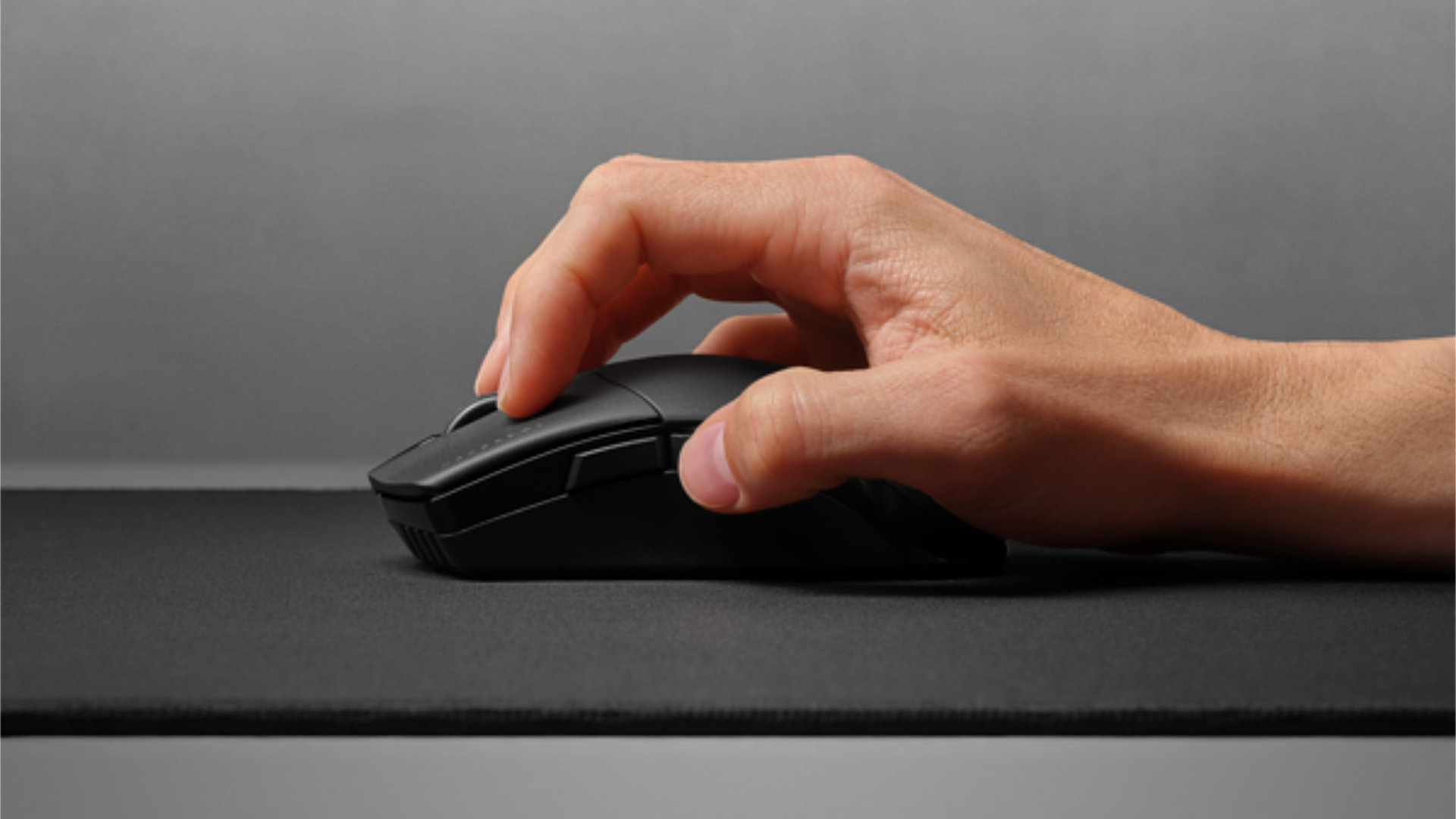
What are palm, claw, and fingertip mouse grips?
Gaming mice are much like footwear—there’s no single solution that fits everyone. You’ll want to pay close attention to how you move your mouse across your mouse pad before settling on the right one. Generally, there are three primary grip styles for reference:
Palm grip involves resting your entire palm fully on the back of the mouse. This style is the least fatiguing for your hand but offers slightly less versatility or precision compared to other grips, relying more on full arm movements for accuracy.
Fingertip grip is where you use only your fingers to control mouse movements, typically gripping the sides of the mouse with your thumb and little finger (or sometimes ring finger). Your palm remains elevated, and your wrist rests on your desk or mousepad behind the mouse. This style often provides the most precision but can be more fatiguing and potentially lead to RSI in your wrist and fingers.
Claw grip is a hybrid of the previous two. In this style, the base of your palm rests on the back of the mouse, but unlike a palm grip, your fingers are bent inwards in a claw shape to actuate buttons and assist with mouse movement. This can offer improved precision over a palm grip and better access to a mouse’s potentially numerous buttons compared to a fingertip grip, but it can also be even more fatiguing.
Wired vs. wireless gaming mouse – which is best for gaming?
This debate has persisted since the advent of wireless gaming mice, when early models clearly suffered from noticeable input lag compared to their wired counterparts. However, modern, high-quality wireless gaming mice no longer have the latency issues they once did. You can confidently purchase a wireless mouse knowing it won’t impede your aim – if they’re sufficient for professional gamers, they’re likely good enough for you.
Gaming mice that include Bluetooth connectivity are also becoming increasingly common. Switching to this connection typically extends battery life and expands your options for using the mouse with a wider range of devices. However, Bluetooth generally introduces a noticeable amount of lag, which might be acceptable for work but can be the difference between winning and losing in competitive FPS games.
As for wired mice, they are gradually becoming less indispensable given the advancements in wireless technology. Nevertheless, they usually remain more affordable (as they don’t require a battery) and guarantee a consistently reliable connection. If you’re on a budget but still demand top-tier performance, you can achieve that with a wired mouse for around $50-$70, whereas many wireless options often exceed $100.
What DPI is good for gaming?
The optimal DPI setting for gaming depends on several factors: the type of game you’re playing, the available space on your desk and mouse pad, and your chosen in-game sensitivity.
For games like FPS titles where precise aim is critical, you’ll likely struggle to maintain accuracy if playing at anything above 800DPI – that’s the recommended range for games such as CS2 and Valorant. For slightly faster-paced games where aim and accuracy are still important but quick movements are also necessary, you might consider going as high as 1,200-1,600DPI, though your raw aim might suffer slightly. In other genres, such as real-time strategy games, where you need to quickly flick your mouse across the entire screen, you might opt for a slightly higher DPI.
Regarding desk space and mouse pads, simply put, the more space you have, the lower DPI you can comfortably use. Professional FPS gamers often use expansive mouse mats and ample desk area, allowing them to perform a 180° turn with a single long arm sweep while maintaining low DPI and high accuracy for fine aiming. If your space is limited to a small mousepad, you might need to increase your DPI setting.
Finally, DPI always works in conjunction with your game and Windows mouse sensitivity. You should always set your Windows sensitivity to 10 to ensure it doesn’t interfere with your mouse’s raw DPI input, and always disable “enhance pointer precision.” Then, within the game, you should generally start with the in-game sensitivity set to 1 or lower. This ensures the game primarily takes the raw input from your mouse and only reduces it, rather than multiplying it. If the game is multiplying your input, you’re losing accuracy; in that case, increase your mouse’s DPI instead.
Which mouse do pro gamers use?
While manufacturers like Logitech, Razer, and SteelSeries frequently sponsor professional gamers, most pros are free to choose any mouse they prefer. For many years, BenQ Zowie was the go-to choice for professionals, thanks to its superb raw performance and excellent shape options. However, numerous other mice now offer equally impressive performance.
Generally, for most esports genres—such as FPS and RTS—the prevailing wisdom is that a lighter mouse is superior. This allows for swifter arm movements, higher precision, and minimal fatigue. Having only the absolutely necessary buttons is also key, which is why many high-end, performance-focused mice today feature only five or six buttons.
Even an amazing mouse can underperform without the right mousepad. Be sure to explore our guide to the best mousepad for a comprehensive set of recommendations. And for more ways to optimize your gaming setup, delve into our guides for the best gaming keyboard and best gaming headset, both of which also cover a range of wired and wireless options.