
Curious about what’s next for Minecraft? Snapshots and Previews are your ticket to an early look! Mojang releases these experimental versions to test out upcoming features, bug fixes, and technical changes, including exciting new blocks, biomes, and mobs. If you play the Java edition, you can safely explore these additions without impacting your main worlds. Bedrock players can join the fun too, via Minecraft Preview. Get ready to be one of the first to experience the next big Minecraft update!
Mojang often announces major Minecraft updates at events like Minecraft Live, bringing exciting new content to the community. Past updates, such as Caves and Cliffs, The Wild Update, and Trails and Tales, have dramatically transformed the game with fresh biomes, blocks, and creatures. To ensure these massive additions are polished, they undergo rigorous testing through Minecraft snapshots and Minecraft Preview. By participating, you get to try out experimental features early and provide valuable feedback to Mojang – it’s a fantastic way to shape the future of your favorite game!

Exploring the Latest: Minecraft Snapshot 25w44a
With the exciting Mounts of Mayhem update on the horizon, snapshot 25w44a offers a thrilling glimpse into its new features, introducing two brand-new mobs: an intimidating mount and a dangerous skeleton variant.
The highly anticipated Mounts of Mayhem update is almost here! This massive content drop brings exciting additions like a new weapon, the spear, and the charming underwater Nautilus mob. Imagine zipping across the ocean on the back of a Nautilus, or even finally riding an official zombie horse in the vanilla game. But there’s more to discover!
This latest snapshot introduces the Camel Husk and The Parched, two formidable new mobs for Mounts of Mayhem. The Parched is a new skeleton type, similar to The Bogged, that appears in deserts after nightfall, much like the familiar Husk mob. This dangerous skeletal foe fires arrows of weakness, while the Husk drains your hunger. Encountering these, along with other desert creatures, in the dark could quickly turn into a perilous situation.
To make things even more challenging, you might find these skeletal menaces riding atop a new Camel Husk, making them even more difficult to evade and defeat.
Don’t miss your chance to explore these exciting new features and more, coming in version 1.21.11 via the latest Java snapshot, and version 1.21.130.24 through the Bedrock beta and Preview programs, all before their official release!
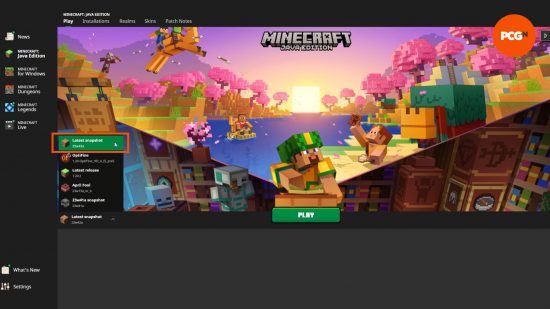
Getting Started: Installing a Minecraft Java Snapshot
Playing the newest Minecraft snapshot is simple, directly from your Minecraft Launcher. Just look for the installation dropdown menu to the left of the prominent green ‘Play’ button, select ‘latest snapshot’ from the options, and hit play. You can then create a new world as you normally would.
While it’s possible to load existing worlds, we highly recommend backing them up beforehand to prevent any potential corruption. Also, be aware that some new features might not appear in areas you’ve already explored within an existing world; you may need to venture into new, ungenerated chunks to find them.
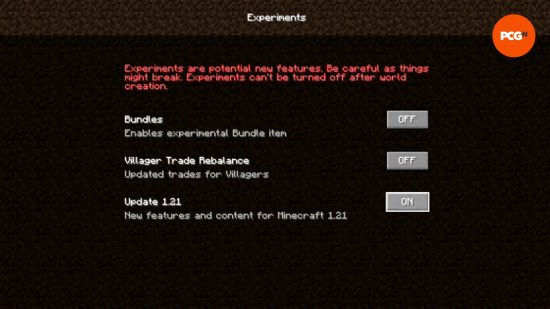
Activating Experimental Features in Snapshots
By default, snapshots primarily focus on bug fixes and technical adjustments. To access new experimental content, like future update features, you’ll need to enable these options. It’s crucial to do this when initially creating your world, as these settings cannot be changed later. Here’s how to enable experimental features:
- Begin by creating a new world as you normally would.
- On the main world creation screen, locate and click ‘Experimental Features’.
- Activate any desired toggles for new content, like upcoming 1.21 features or even exciting bundles you’ve been waiting for!
- Launch your new world and explore.
Revisiting Older or Different Minecraft Snapshots
Want to experience past Minecraft snapshots or even older versions of the game? This is entirely possible, though it involves a few additional steps, similar to loading any archived version of Minecraft. To install and play a specific older snapshot or game version:
- Open your Minecraft Launcher.
- Navigate to the ‘Installations’ tab.
- If you’re looking for older snapshots, make sure the ‘snapshots’ checkbox is enabled.
- Click the ‘New Installation’ button.
- Browse the dropdown list to find your desired Minecraft version.
- Give your new installation a memorable name.
- Click ‘Create’.
- Return to the ‘Play’ tab at the top of the Launcher.
- Select your newly created installation from the dropdown menu.
- Finally, click ‘Play’ to launch your chosen version!
As a precaution, always back up any existing worlds before loading them into an older installation, to protect against potential data corruption. If you’re unsure which snapshot contains specific changes, detailed changelogs are available on the official Minecraft website.
Now that you’re equipped to explore the latest Minecraft features through snapshots, go ahead and dive in! If you prefer to wait for the official release to enjoy the complete experience, there’s still plenty to enhance your current Minecraft world. Consider trying out some fantastic Minecraft texture packs or exciting Minecraft adventure maps. Or, if you’re looking for something entirely different, explore other games similar to Minecraft – just remember to return for the next big update!