
Searching for the best Hollow Knight Silksong mods? After years of eager anticipation, Silksong has finally arrived, captivating both seasoned Metroidvania fans and newcomers alike. While many are familiar with the challenging nature of the Hollow Knight universe, some new players might be caught off guard by its difficulty.
Since Team Cherry, the brilliant minds behind the Hollow Knight series, are steadfast in their game design vision, it falls to the dedicated community to enhance the experience. Whether you’re hoping to dial down the intense challenge or streamline your gameplay by reducing lengthy boss runbacks, these Hollow Knight Silksong mods offer something for every adventurer.
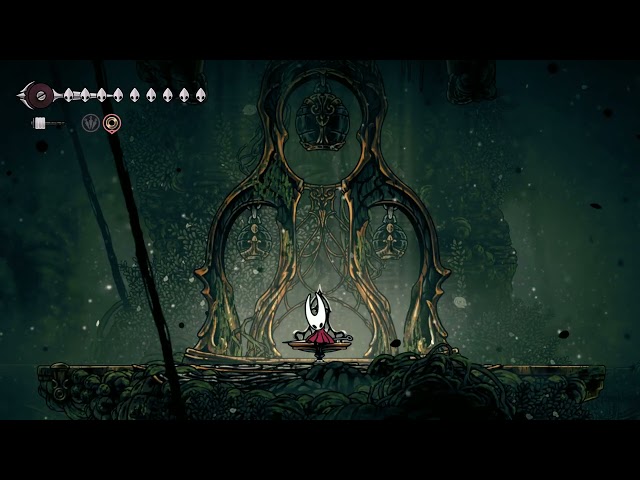
Bonfire Teleport
While Silksong’s inherent fast travel system makes navigating the vast world simpler, imagine an even smoother experience. After investing time and effort (and often Rosaries) into unlocking various benches, you can now enhance their utility with kassent’s Bonfire Teleport mod.
Simply open your in-game map, select any unlocked bench icon, and instantly warp to that spot. This mod stands out for its straightforward functionality and integrates so smoothly, it feels like an original feature of the game.

Hidden Wall Flicker
Hidden walls are a classic Metroidvania element, delighting players who meticulously search for environmental hints and subtle details. However, if these visual cues often escape your notice, OrionBonnie’s Hidden Wall Flicker mod offers a perfect solution. It helps you easily discover these secret paths without completely revealing them. Now, certain hidden walls will subtly flicker with a darker hue, shimmer with particles, and even emit faint particle trails, ensuring you never overlook a concealed entrance again.

Boss Health Bar
One of the most frustrating aspects of confronting Silksong’s formidable bosses is the absence of an on-screen health bar, leaving you guessing about the fight’s duration. Thanks to xiaohai’s Health Bar mod, you can now precisely track the damage you inflict with each strike. Every enemy gains a health bar, and during boss encounters, a large, clear health bar appears at the bottom of the screen, providing vital information on when to press for the final blow.
This mod also boasts extensive customization options for the health bars’ placement and appearance. If you prefer, you can opt to display health bars only for bosses, disabling them for regular enemies. You can even choose to show numerical values for remaining health, offering a precise breakdown of how many attacks are needed to finish the battle.

Rebirth Anywhere
If you have an aversion to arduous boss runbacks, you’ll undoubtedly appreciate kassent’s Stakes of Marika – Rebirth Anywhere mod. Drawing inspiration from Elden Ring’s checkpoint system, Rebirth Anywhere instantly respawns you at the scene entrance instead of forcing a long trek from a bench. This applies to all deaths, from grueling boss fights to tricky platforming sections, saving you significant time over a single playthrough.
It’s important to note that certain game sections are designed for death to trigger specific scenes. Fortunately, this mod includes a hotkey, allowing you to activate or deactivate it mid-game, providing the flexibility to use it only when frustrations mount against particularly challenging bosses.

Boss Retry Menu
Similar to the Rebirth Anywhere mod, Pilout’s Boss Retry Menu introduces a helpful screen after you fall in combat. This screen provides the immediate option to retry the boss fight or return to a bench to adjust your loadout. While some players have requested automatic tool replenishment after respawning, this feature has not been added to maintain a balanced difficulty. However, you can achieve this by combining it with REALMWTH’s Tools Auto Replenish mod.

Easy Mode
Team Cherry is continuously refining the game’s difficulty, but their adjustments might not align with everyone’s preferences. Some players desire a different approach to difficulty modifications than what the developers envision.
Thankfully, didrio’s Relaxed Mode mod addresses this by making comprehensive changes to gameplay, including increased rates for rosaries and shards, reduced incoming damage from enemies, and many more tweaks. If Silksong proves too daunting, this mod will significantly ease your experience.

Always Have Compass
Navigating the Silksong map can be particularly challenging for players new to Metroidvania games, especially in the early stages where you must carefully choose from your limited selection of Tools. Most games typically allow you to see your location on the map without any penalty. With LordGregory’s Always Have Compass mod, you no longer have to make that difficult decision.
If this mod sounds appealing, you might also consider LordGregory’s Always Have Magnet Effect mod, which automatically draws in rosaries and shards without requiring either of these tools to be equipped.

Instant Rosaries
Avoid the tedious grind of farming Rosaries with ez’s Simple Rosary Cheat, which instantly grants you 1,000 rosaries with a single keystroke. Now, whenever you encounter a merchant, you’ll never have to worry about insufficient funds. Simply press F3, and you’ll immediately possess all the money you need.

Luma HDR
For those with a high-end television or gaming monitor, the Luma HDR mod is an absolute must-have, introducing native HDR support to the game. Even if you don’t have top-tier hardware, this mod still offers significant benefits for anyone passionate about accurate color representation.
While Windows 11’s Auto HDR feature can provide a similar effect, it can’t quite match the immersive impact of native HDR, which delivers a cleaner, more vibrant image overall. This visual enhancement truly needs to be experienced firsthand to be fully appreciated, so be sure to watch the video above if you still have any doubts.

Shadow Dash
Fans of the original Hollow Knight might find the new version of Silksong’s Dash ability somewhat frustrating due to its lack of invincibility frames. However, with Null_993’s Shadow Dash mod, you can restore iframes to the dash. Additionally, this mod offers settings to customize the dash speed multiplier, allowing you to traverse Pharloom at a much quicker pace than before.

All Enemies Drop Rosary Beads
Team Cherry deliberately designed specific enemies to drop rosary beads. However, if you’re looking to simplify your journey, YukkuriC’s All Enemies Drop Rosary Beads mod ensures you receive a reward every time you defeat any foe. The number of rosaries you gain is proportional to the enemy’s total health, a bonus that also extends to bosses, guaranteeing you’re always a little richer after each encounter.
Silksong Multiplayer
While few anticipated Silksong to be among the best co-op games, this could become a reality in the future thanks to this groundbreaking mod. Created by nek5, SilklessCoop allows you to team up with your friends and explore the game’s world together.
It’s important to remember that this is nek5’s inaugural mod, so be prepared for a potentially involved installation process and a few bugs that are still being ironed out. As a proof of concept, it demonstrates immense potential for a cooperative version of Silksong, making it definitely one to watch.

How to install Silksong mods
Before proceeding with any mod installations, we strongly advise backing up your save file. The save directory is typically located in ‘AppData\LocalLow\Team Cherry\Hollow Knight Silksong’. While issues are rare, taking this precaution ensures your game progress remains safe.
Silksong utilizes the same engine as its predecessor, Hollow Knight, which explains the rapid availability of many mods, even just over a week after the game’s release. We’ve confirmed these installation steps work for both the Xbox Game Pass and Steam versions, with the primary difference being the location of your game directory folders.
Here are the steps to install Hollow Knight Silksong mods:
- Download the latest version of BepInEx 5 from a reputable source like GitHub.
- Extract the contents of the .zip folder directly into your Silksong game directory (where the game executable is located).
- Launch Silksong once to allow BepInEx 5 to initialize, then close the game.
- You should now find a new ‘BepInEx’ folder within your game directory.
- Locate the ‘Plugins’ folder inside ‘BepInEx’ and extract the contents of your downloaded mods into it.
It’s always a good idea to check the posts section of any mod you download for potential conflicts with other mods you might be running. That said, we haven’t encountered any issues running multiple mods simultaneously, so your experience may vary.
These are just some of the top Silksong mods currently available, and we’ll continue to update this list as more exciting additions arrive. With these powerful modifications at your fingertips, you’ll be well-equipped to conquer the single-player game. Be sure to explore our Silksong endings guide to discover how to achieve the true ending.